
What makes passkey wallets different
Passkey wallets replace traditional 12-word seed phrases with device-bound biometric keys, shifting Web3 security from user-managed backups to hardware-enforced protections. Unlike legacy wallets that store private keys in plaintext files or cloud backups, a passkey wallet is a Web3 smart account that uses the WebAuthn standard to generate and store cryptographic keys directly within your device’s secure enclave.
This architectural change eliminates the most common failure point in crypto security: human error. With a seed phrase, losing the physical backup or sharing it accidentally results in irreversible asset loss. With a passkey wallet, the private key never leaves the device. Authentication requires your fingerprint, face scan, or PIN, making remote theft of the key material nearly impossible without physical access to the phone or computer.
The result is a seamless integration of Web2 convenience and Web3 sovereignty. You no longer need to memorize complex strings or worry about phishing sites stealing your recovery phrase. The key pair is generated on the user’s device and stored in a secure hardware module, meaning the wallet’s security is tied to the device’s physical integrity rather than a fragile memory aid.
Why biometric authentication beats seed phrases
The shift from seed phrases to biometric authentication is not just a convenience upgrade; it is a fundamental security improvement. Seed phrases rely on human memory and physical storage, two areas where mistakes are common and catastrophic. Passkey wallets move that responsibility to the device’s secure hardware enclave, where biometrics like Face ID or fingerprint scans protect the private key. This eliminates the single biggest point of failure in traditional crypto custody: the user.
Phishing resistance
Traditional wallets require you to manually type or paste your seed phrase to recover access or sign transactions on unfamiliar sites. This process is vulnerable to phishing attacks, where malicious sites trick users into revealing their 12 or 24 words. Passkey wallets use cryptographic protocols that bind the authentication to the specific domain. If you are on a fake site, the biometric prompt will not appear, or the transaction will fail because the origin does not match. You cannot accidentally give away your keys to a phishing site because you never see them.
Local storage and hardware security
Seed phrases are often stored in plaintext notes, screenshots, or physical papers that can be stolen, lost, or damaged. Passkey wallets store the private key within the device’s Secure Enclave or Trusted Platform Module (TPM). This hardware-backed storage is isolated from the main operating system, making it extremely difficult for malware to extract the key even if the device is compromised. The biometric check acts as the only way to access this hardware-protected key, adding a layer of physical presence verification that a piece of paper cannot offer.
Elimination of human error
Writing down a seed phrase introduces the risk of typos, smudged ink, or misplacing the paper. Recovering a wallet from a damaged or incomplete seed phrase is often impossible. With passkey wallets, recovery is handled through the device’s built-in account recovery mechanisms or cross-device sync. You do not need to memorize a string of random words or worry about the physical degradation of your recovery backup. The authentication is tied to your identity and device, not a static string of text that can be lost forever.
How passkey wallets handle key recovery
The most common fear with any crypto wallet is losing access. Passkey wallets replace the traditional seed phrase with a cryptographic structure that makes permanent loss nearly impossible. Instead of relying on a single string of words, these wallets use Multi-Party Computation (MPC) and social recovery modules to split the private key into fragments.
In an MPC setup, the key material is distributed across multiple parties. Your personal passkey protects your specific share, while the wallet provider holds another. Neither party can reconstruct the full private key alone. This means that if you lose your device, the provider can help you restore access without ever seeing your actual funds or private key. It shifts the burden of security from your memory to cryptographic verification.
Social recovery adds another layer of safety. You designate trusted contacts—friends, family, or even other devices—as guardians. If you lose your primary passkey, these guardians can vote to authorize a new key. This method removes the single point of failure that seed phrases represent. You are no longer the sole custodian of your access; the network helps you reclaim it.
This architecture ensures that your assets remain accessible even if your primary device is lost, stolen, or broken. The passkey itself is not stored on a server; it is generated and stored locally on your device. The recovery process relies on verifying your identity through these trusted guardians or the provider, rather than exposing the key itself.
Top passkey wallet providers in 2026
The landscape for passkey wallets has consolidated around a few major players who have successfully merged biometric convenience with institutional-grade security. These implementations generally fall into two technical camps: those that keep key material local on the device and those that use Multi-Party Computation (MPC) to distribute it. Understanding this distinction is essential for evaluating how your private keys are actually protected.
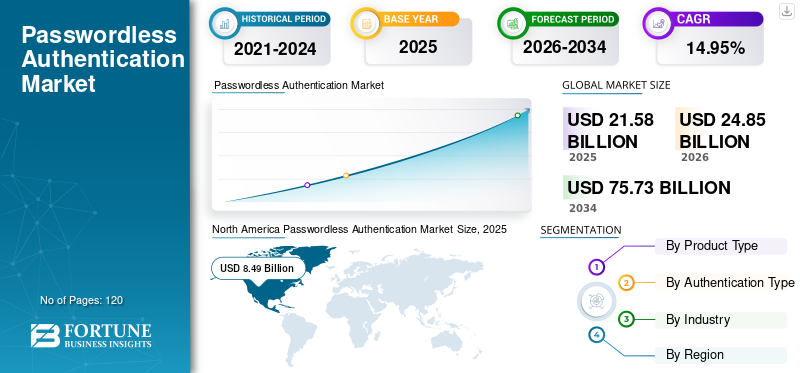
The market for passwordless authentication is expanding rapidly, driven by the need to eliminate seed phrase friction. As shown in the market analysis below, the shift away from traditional passwords is accelerating, creating a clear demand for wallets that leverage WebAuthn standards for daily transactions.
Comparison of Leading Implementations
The table below compares the core architectural differences between the leading passkey wallet providers. These distinctions determine not just security posture, but also how recovery works if you lose access to your device.
| Provider | Underlying Tech | Recovery Method | Supported Chains |
|---|---|---|---|
| Circle Modular | Local Device Key | Social Recovery Modules | EVM (ETH, POL, etc.) |
| Para Wallet | Local Device Key | Passkey Backup + Social | Multi-chain (BTC, ETH) |
| Spark Wallet | MPC Distributed | Provider-held Shares | Bitcoin (BTC) |
| Argent | MPC + Local Smart Account | Social Recovery + Passkeys | EVM (ETH, Base, etc.) |
Smart Account Integration
Most modern passkey wallets are built on top of smart account standards, such as ERC-4337. This architecture allows the passkey to act as the default signer for transactions, enabling features like gasless transactions and batched operations. Circle’s modular approach, for example, treats the passkey as the primary identity layer, while modules handle specific functions like spending limits or recovery logic. This separation of concerns makes the wallet more flexible than traditional account-based models.
Security Considerations
While passkeys remove the burden of memorizing seed phrases, they introduce a single point of failure: the device itself. If your phone is lost, the passkey is gone unless a robust recovery mechanism is in place. Providers like Spark and Argent mitigate this by using MPC, where key shares are distributed across multiple parties. However, this introduces a trust dependency on the provider. For maximum autonomy, local key storage with social recovery modules remains the preferred choice for self-custody advocates.
Technical traders should monitor the underlying assets these wallets support. The performance of the Ethereum network, for instance, directly impacts the cost and speed of smart account transactions.
Limitations and security considerations
Passkey wallets replace the traditional seed phrase with biometric authentication tied to your device. While this removes the burden of memorizing twelve words, it introduces a new class of risks centered on device dependency. If your phone is lost, stolen, or damaged, accessing your crypto assets becomes significantly more complex than recovering a paper backup.
The primary vulnerability lies in the hardware itself. Unlike a seed phrase that can survive a fire or a lost phone, a passkey is cryptographically bound to a specific secure enclave. Losing your device means losing your direct access unless you have already configured cross-device sync or a designated recovery method. For users who rely on a single smartphone, this creates a single point of failure that can lock them out of their funds entirely.
Recovery strategies must therefore shift from "writing down words" to managing digital identity. Most passkey ecosystems allow you to sync credentials across multiple devices or designate a trusted contact for recovery. However, these features are not universally standardized across all wallet providers. Users must verify that their specific wallet supports robust backup protocols before relying on it for significant holdings.
Additionally, the convenience of biometrics can create a false sense of security. While passkeys are resistant to phishing, they are not immune to sophisticated device-level exploits or coercion. Understanding the limitations of your device's security model is essential. You are no longer protecting a secret phrase; you are protecting the integrity of your hardware and the accounts linked to it.
Frequently asked questions about passkeys
Can your passkey be hacked?
Passkeys use public-key cryptography, making them resistant to phishing and remote hacking. Unlike passwords, the private key never leaves your device. However, if an attacker physically steals your unlocked device, they may gain access. The security relies heavily on your device’s biometric or PIN protection.
What is the safest passkey?
The safest passkeys are stored in hardware-backed secure enclaves, such as Apple’s Secure Enclave or Android’s Titan M chip. These isolated chips prevent software from extracting the private key, even if the operating system is compromised. Using a dedicated hardware key (like a YubiKey) offers the highest level of physical security.
What are the downsides of passkeys?
The primary downside is device dependency. If you lose your phone and lack a backup method, you could be locked out of your wallet. Additionally, passkey support is not yet universal across all Web3 applications, and cross-platform syncing can sometimes be tricky depending on the ecosystem.
Where can I find the base wallet passkey?
Base Wallet (formerly Coinbase Wallet) allows you to enable passkey authentication during the initial setup or in the security settings. Look for the "Security" or "Account Recovery" section in your wallet app to add a passkey as a backup method, ensuring you don’t lose access to your funds.
No comments yet. Be the first to share your thoughts!