
What passkey wallets actually are
A passkey wallet is a digital asset interface that uses biometric authentication protocols instead of traditional seed phrases or passwords. It relies on the WebAuthn and FIDO2 standards to generate a cryptographic key pair directly on your device. Unlike traditional setups, the private key remains stored within the hardware secure enclave, and you access it using Face ID, Touch ID, or a PIN.
This structure removes the need to memorize or physically secure a 12-24 word recovery phrase. Instead, the wallet acts as a secure enclave. When you need to sign a transaction, the device uses the biometric data to authenticate the user locally. The signature is created and sent, but the key itself remains locked inside the device’s secure chip.
This differs significantly from standard password-based logins, where a secret is transmitted or stored in a way that can be compromised. It also solves the "key management" problem of seed phrase wallets, where losing the physical backup means losing access to funds permanently. With passkeys, recovery is handled through the device manufacturer’s ecosystem or a linked password manager, making the process more resilient to human error.
How passkey wallets secure your assets
Passkey wallets replace the traditional seed phrase with a cryptographic pair generated locally on your device. Unlike seed phrases, which are static strings of words stored in plaintext or encrypted backups, passkey private keys never leave your device’s secure enclave. They are encrypted using your device’s native biometric or PIN verification, meaning the private key is never exposed to the operating system or the internet.
This architecture fundamentally changes the threat model. Traditional wallets are vulnerable to phishing because passwords can be entered into fake websites. Passkeys are phishing-resistant by design: the cryptographic signature is bound to the specific domain of the legitimate application. If you interact with a spoofed site, the passkey will refuse to sign the transaction, effectively neutralizing the most common vector for crypto theft.
| Feature | Seed Phrase Wallet | Passkey Wallet |
|---|---|---|
| Key Storage | User-managed backup (text file or paper) | Device secure enclave (hardware-backed) |
| Phishing Risk | High (credentials can be entered on fake sites) | Low (cryptographically bound to domain) |
| Recovery | User responsible for backup integrity | Provider-assisted or device recovery options |
The reduction in high-stakes risk is immediate. Seed phrase loss is irreversible and permanent; if you misplace the 12 or 24 words, your assets are gone forever. Passkey wallets shift this burden away from the user’s memory. Recovery is handled through established digital identity providers or device backups, removing the single point of failure that has plagued crypto adoption for a decade.
By anchoring security to the device you already carry and verify daily, passkey wallets make security a byproduct of convenience rather than a separate chore. This alignment of user behavior and cryptographic security is what makes them the next generation standard for asset protection.
Set up your passkey wallet
Passkey wallets replace the traditional seed phrase with device-based authentication. When you create a wallet, your private keys are generated locally on your device and encrypted using the passkey protocol. This process relies on biometrics or a PIN stored in your phone’s secure enclave, making the keys impossible to extract or phish. You are not storing a backup string; you are securing access through the hardware you already carry.
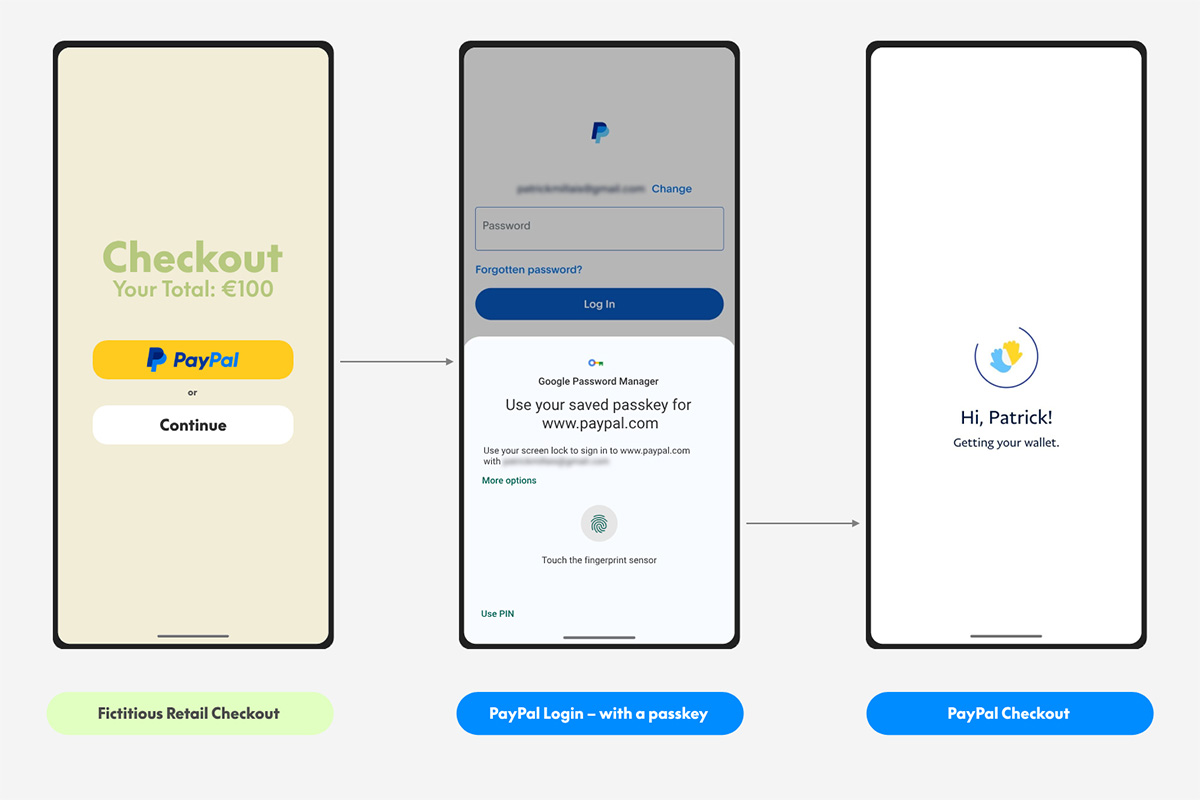
The setup flow is designed to be frictionless. You do not need to write down twelve words or manage complex password managers. Instead, the wallet integrates with your operating system’s native authentication services, such as Apple’s iCloud Keychain or Google’s Password Manager. This approach lowers the barrier to entry for new users while maintaining the self-custody model required for blockchain assets.
Check device requirements
Before you begin, ensure your device supports the FIDO2 standard. Most modern smartphones (iOS 16+, Android 9+) and computers with Windows Hello or macOS Touch ID are compatible. You must have a recent version of a supported wallet app, such as Exodus, which currently offers passkey integration. If your device lacks biometric sensors, you can use a strong PIN, though biometrics remain the primary security layer.
Create your account
Download the wallet application and select the option to create a new passkey wallet. You will be prompted to name your wallet and choose a recovery method. Unlike traditional wallets, there is no seed phrase to back up. Instead, you rely on the cloud sync features of your device’s passkey service. For example, iCloud Keychain can sync your passkeys across your Apple devices, ensuring you can access your wallet from your iPad or Mac if you lose your phone.
Verify your identity
The app will trigger your device’s biometric prompt. Place your finger on the sensor or look at the camera to authorize the key generation. This step confirms that you are the owner of the device. The private key is then derived and stored securely. You will receive a confirmation that your wallet is ready. From this point on, every transaction or login will require this same biometric verification, creating a phishing-resistant layer that seed phrases cannot match.
Secure your backup
While you do not have a seed phrase, you do have a recovery path. If you lose your device, you can recover your wallet by logging into your cloud account (iCloud, Google, or Microsoft) on a new device. Ensure your cloud account is secured with two-factor authentication. This adds a second layer of protection, preventing unauthorized access to your passkeys even if your cloud credentials are compromised. Keep your device and cloud account updated to maintain this security posture.
Common passkey wallet mistakes
Adopting passkey wallets introduces a different set of risks than traditional seed phrases. Users often assume the convenience of biometric login eliminates the need for backup planning, or they confuse the underlying technology with standard password managers. These misunderstandings can lead to locked-out accounts or false security.
Skipping recovery plans
The most critical error is treating the device as the only copy of the key. If your phone is lost, stolen, or damaged, you lose access to your assets unless you have a recovery method. Unlike seed phrases, which are static text you can write down, passkeys are tied to hardware. You must set up backup codes or cross-device recovery before you need them. Waiting until after a device failure is too late.
Confusing passkeys with passwords
Passkeys are not passwords. They are cryptographic key pairs where the private key never leaves your device. Treating them like passwords—by trying to copy, paste, or share them—breaks their security model. As noted by Thales, passkeys are ideal for frequent authentication, while wallets handle occasional identity checks. Understanding this distinction prevents users from attempting workarounds that compromise security.
Ignoring device limits
Not all devices support passkeys equally. Older hardware may lack the secure enclave required for key generation. Users often assume their current phone is sufficient, only to find it incompatible with certain wallet services. Check device compatibility before migrating significant funds. A passkey is only as secure as the hardware holding it.
Market trends for passkey wallets
The shift from seed phrases to biometric authentication is no longer theoretical. In 2026, passkey wallets are moving from experimental prototypes to mainstream infrastructure. This transition addresses the primary friction point in crypto adoption: the burden of managing private keys. By leveraging device-based authentication like Face ID or fingerprint scans, these wallets simplify blockchain interactions while strengthening security posture.
Major industry players are accelerating this shift. The Passkeys Foundation describes the technology as "elegant" and "simple to deploy," highlighting its superiority in user experience over traditional password-based systems. This sentiment is echoed by technical providers like Chainlink, which notes that passkey wallets replace cumbersome seed phrases with biometric protocols trusted by users in their daily digital lives.
The market signal is clear. Users are abandoning complex mnemonic phrases in favor of interfaces that feel native to their devices. This reduces the risk of catastrophic loss due to forgotten keys or phishing attacks. As regulatory frameworks mature, the combination of enhanced security and streamlined onboarding positions passkey wallets as the standard for consumer-facing crypto products.
This chart reflects broader market activity during the period of increased passkey wallet integration. While price action fluctuates, the underlying trend shows growing institutional and retail interest in user-friendly, secure entry points into the blockchain ecosystem. The adoption of passkey technology correlates with periods of heightened demand for accessible digital asset management.
No comments yet. Be the first to share your thoughts!